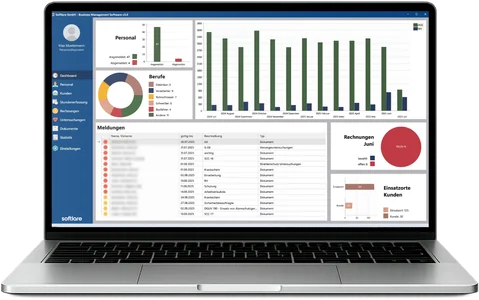
SBM is software for staffing agencies in temporary agency work: clients and terms, orders and scheduling, personnel file, time tracking, Equal Pay, payroll preparation and invoicing all work with the same data. Your team enters each piece of information once – in the office, in scheduling and in payroll accounting. The software runs as a Windows application with its own cloud database on servers in Germany; support and development are based together in Worms.
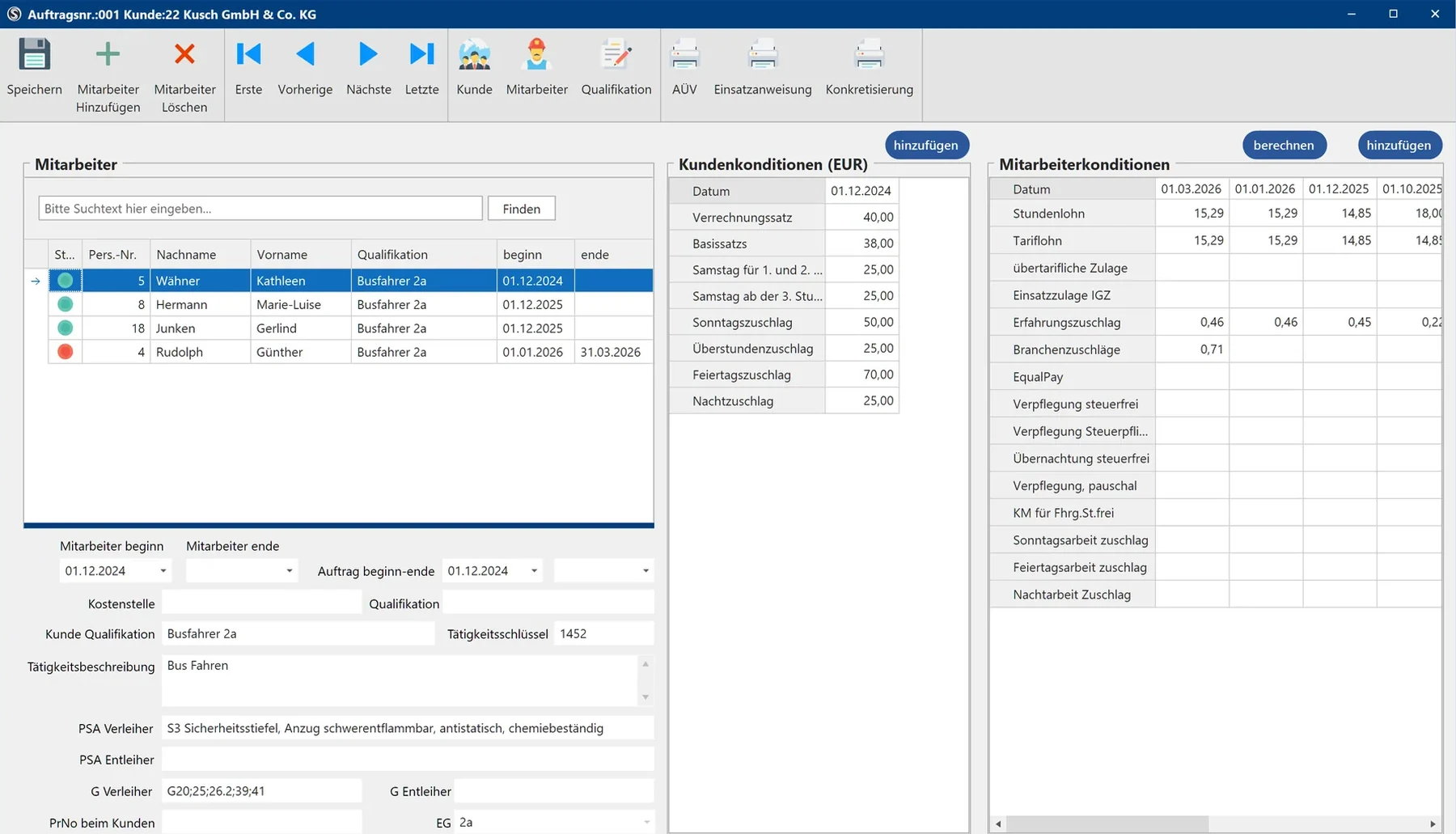

A staffing agency works with many clients, changing assignments and employees with their own collectively agreed rates, supplements and deadlines. SBM maps this day-to-day work as an industry solution: every area draws on the same master data – from the first contact with the client to the paid invoice. You activate the modules individually; user rights determine who sees which information.
Clients, prospects, suppliers and accommodation in one client management module. For each client, you store charge rates from an effective date, supplements for night, Saturday, Sunday and public holiday work, payment terms, industry collective agreement and Equal Pay type.
Every assignment starts with the order: work site, qualification, industry collective agreement, pay and charge rate. The scheduling board (Dispotafel) shows all assignments per client and work site as a list or Kanban board – with a column for available employees. The temporary agency work contract (Arbeitnehmerüberlassungsvertrag), the specification (Konkretisierung) with maximum assignment period, the assignment instructions and the risk assessment are created fully filled in – from your own Word templates.
Master data, qualifications, collectively agreed pay, social insurance data, residence permits and certificates of every employee in one place. The digital personnel file automatically archives every printed document as a PDF.
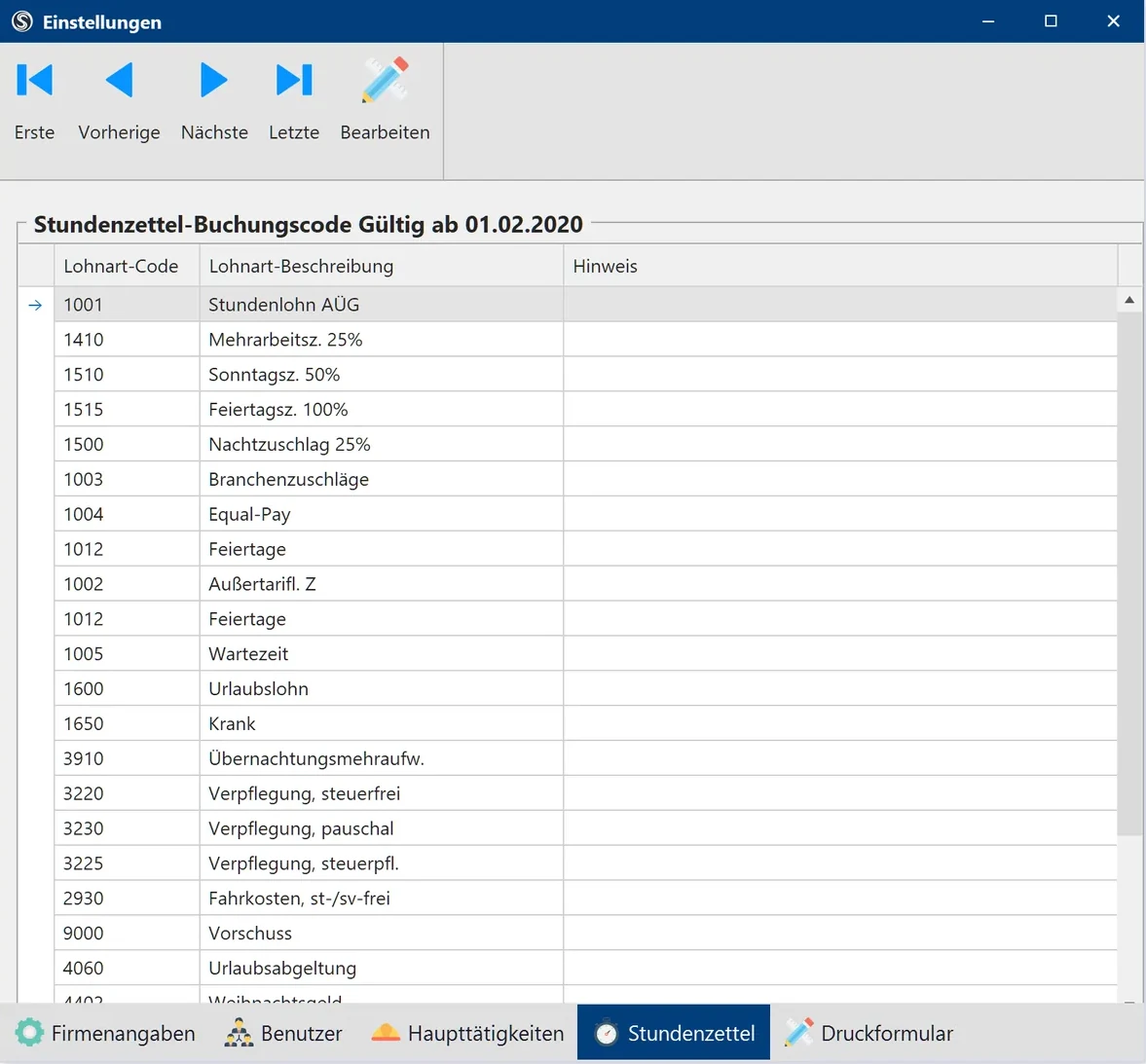
Working hours reach the timesheet (Stundenzettel) via terminal with chip or card and via the employee app. SBM automatically allocates the hours to supplements and checks every timesheet for typical errors before the month-end closing.
For each client, you choose Equal Pay from the 9th month, industry supplements (Branchenzuschläge) from day 1 or Equal Pay from day 1. SBM calculates the start and the stages automatically for each employee and client.
SBM prepares wage types, supplements, working time account, advances and garnishments for payroll and transfers the monthly values to DATEV or Addison. The payroll itself is produced by your payroll program.
The approved hours become the invoice to the client – with supplements, in your client’s invoice layout on request and as an e-invoice in ZUGFeRD/XRechnung format. You keep track of open items and dunning levels.
The dashboard reports deadlines such as the maximum assignment period, contract end and residence permits. The statistics show hours, costs and Equal Pay per client. For several locations, there are branches and graded user rights.
The software connects the workflows of sales, scheduling, payroll accounting and bookkeeping. Whatever is stored once in the client or the order, SBM uses in every further step – which means fewer errors and more time for clients and employees.
A new client or prospect goes into the contact manager; with the framework agreement, you store charge rates, supplements, industry collective agreement and maximum assignment period.
The scheduler creates the order and assigns available employees with matching qualifications – with start and end dates per person.
The temporary agency work contract, specification and assignment instructions are created from the same data; the assignment instructions can be signed digitally in the app.
Employees clock in at the terminal or in the app. Before the month-end closing, SBM checks every timesheet – for example for hours on leave days or hours without a work site.
The same hours produce the monthly values for your payroll program and the invoice to the client – without retyping.
When you switch to SBM, we migrate the data your previous program can export, along with your own Word templates.
| Topic | Excel, Word and several programs | With SBM |
|---|---|---|
| Clients and terms | Contracts and prices in folders | Terms per client from an effective date |
| Scheduling | Lists and phoning around | Scheduling board with available employees |
| AÜG documents | Written in Word for each assignment | With one click from the order |
| Working hours | Paper timesheets typed up | Terminal and app, straight into the timesheet |
| Equal Pay | Effective dates recalculated by hand | Start and stages calculated automatically |
| Payroll | Hours passed on to the payroll office | Monthly values to DATEV or Addison |
| Invoicing | Hours copied into the invoice | Invoice from the timesheet, also as an e-invoice |
| Deadlines | Calendar, notes or in your head | Alerts in the dashboard |
Staffing agency (Personaldienstleister) is the umbrella term for companies that assign staff to other companies, place staff with them or carry out contracts with their own personnel. Most of the industry is temporary agency work, legally Arbeitnehmerüberlassung: the staffing agency (temporary work agency, Verleiher) hires employees and assigns them to a client (user undertaking, Entleiher), in whose business they work. In addition, there is recruitment (Personalvermittlung) and contracts for work (Werkverträge).
Temporary agency work comes with fixed obligations: the permit from the Federal Employment Agency (Bundesagentur für Arbeit) (§ 1 AÜG), the temporary agency work contract in text form (§ 12 AÜG, since 1 January 2025), the specification (Konkretisierung) of each temporary agency worker before the assignment, the maximum assignment period of 18 months in principle and the principle of equal treatment, Equal Pay (§ 8 AÜG). On top of this come the collective agreements for temporary agency work and the industry supplements of the industries of assignment.
That is why general HR or accounting software is rarely enough. A staffing agency works in a triangle of temporary work agency, employee and client: every assignment has its own terms, supplements and deadlines, and the same hours are the basis for both payroll and invoicing. Software for staffing agencies connects this data so that it is not maintained in several programs.
When choosing a solution, the key question is its focus. Recruiting and applicant management software mainly supports the search for candidates: job ads, talent pools, matching; some of these solutions offer artificial intelligence (AI) features for this. Industry software for temporary staffing such as SBM covers the processing – clients, orders, scheduling, AÜG documents, time tracking, Equal Pay, payroll preparation and invoicing. Many staffing agencies combine both.
Which requirements software for staffing agencies should meet depends on the tasks in the company. In temporary agency work, these are above all specialist modules for the legal requirements – AÜG documents, Equal Pay, industry supplements and maximum assignment period –, monitoring of deadlines, time tracking without duplicate data entry, an interface to the payroll program with data exchange in both directions, reports and analyses per client, and data protection in accordance with the GDPR (DSGVO) with servers in Germany. Modern temporary staffing software must also support the requirements of the GDPR – with user rights, logs and separate data for each company. Training and a dedicated contact person who knows the processes of temporary staffing are just as important.
When comparing providers, a checklist with your own cases helps: How is the temporary agency work contract created? How are Equal Pay and industry supplements calculated? How do working hours get into the timesheet, and how do the monthly values reach your payroll program? Who helps with the switch through data migration and training – and who can you reach in day-to-day work?
Note: General overview, not legal advice. Responsibility for compliance with the AÜG lies with the temporary work agency.
Your question is not listed? Call us or arrange a free presentation.
+49 (0) 6241 678 789-0Software for staffing agencies is an industry solution that connects the workflows of a temporary staffing or staffing services company in one system: client management with terms, orders and scheduling, HR administration, AÜG documents, time tracking, Equal Pay and industry supplements, payroll preparation and invoicing. SBM from Softlare GmbH is such software for staffing agencies in temporary agency work (Arbeitnehmerüberlassung).
SBM is built for staffing agencies and temporary staffing companies that deploy workers in temporary agency work or under a contract for work (Werkvertrag) – in manufacturing, logistics, plant engineering or care. The modules are activated individually, so SBM suits small temporary work agencies just as well as companies with several branches.
No. SBM has no recruiting module of its own with job ads or a talent pool. You can keep applicants in the personnel master data with the status “Applicant” and print an employee profile for clients. SBM focuses on processing: clients, orders, scheduling, AÜG documents, time tracking, Equal Pay, payroll preparation and invoicing.
The key functions: client and prospect management with contact manager, terms per client, orders and scheduling board, shift roster, personnel file with expiry dates, AÜG documents from Word templates, time tracking via terminal and app, timesheets with automatic supplements, Equal Pay and industry supplements, working time account, payroll preparation with DATEV and Addison export, invoicing and e-invoicing, dashboard, statistics and user rights.
The key requirements: the software maps the processes of temporary staffing in specialist modules – AÜG documents, Equal Pay, industry supplements and maximum assignment period –, monitors deadlines, takes over working hours without duplicate data entry, passes the data to the payroll program and creates the invoices. On top of this come reports and analyses, user rights, data protection in accordance with the GDPR (DSGVO) and a contact person you can reach. How well a provider meets these requirements is shown by a test with your own cases.
For sales and client support, there is the contact manager: notes, calls, emails, tasks and meetings for clients and prospects, with priority, due date and reminder in the dashboard. SBM does not focus on artificial intelligence (AI) for matching candidates, but on processing: SBM calculates supplements, Equal Pay stages, deadlines and invoices according to fixed, traceable rules from the terms you have stored.
The statistics show total hours, costs and headcount as a chart, Equal Pay and industry supplements, an overall list of hours as well as sickness and holiday rates – filtered by client, work site and period. Each user saves their list views with their own columns and filters, and overviews such as the personnel list, timesheet list or statistics can be exported to Excel. The dashboard shows the monthly hours by temporary agency work and contract for work, as well as open and paid invoices.
In the order, you set the work site, qualification, collective agreement and terms and assign employees; a filter shows available, currently assigned or all employees. The scheduling board shows all assignments per client and work site as a list or Kanban board, with a column for available employees. You plan shifts in the shift roster and publish them in the employee app. This way, your team can see at a glance in workforce planning who is available and who is already on assignment.
Via time clock terminals with chip or card, which are connected directly to SBM through a built-in SIM card, and via the employee app with GPS clocking. Once approved, the times land in the timesheet. SBM automatically allocates the hours to night, Saturday, Sunday and public holiday supplements – separately for employee and client.
Yes. For each client, you set the Equal Pay type – Equal Pay from the 9th month, industry supplements from day 1 or Equal Pay from day 1. SBM calculates the start and the stages for each employee and client and shows the values per day in the timesheet. The collectively agreed rates for temporary agency work are maintained as data and switched over in a single step when collectively agreed pay rises.
No. SBM prepares the payroll – wage types, supplements, Equal Pay, working time account, advances, garnishments and absences – and transfers the monthly values to DATEV (online or as a file) or to Addison. The payroll itself is produced by your payroll program or your tax adviser.
For a service period, SBM creates the invoice automatically from the timesheets, with all of the client’s supplements. Invoices are available as PDF and as e-invoices in ZUGFeRD 2.3 format with the XRechnung or EN 16931 profile. On request, we replicate your client’s existing invoice layout. You manage open items and dunning levels in SBM.
With DATEV online (DATEVconnect), SBM reads employees and writes the monthly values; before the month-end closing, SBM reconciles both sides. Without online access, there is the export as a file for DATEV Lohn und Gehalt and for LODAS, and employee data can be imported from DATEV. On top of this come the monthly export for Addison, Excel exports, serial letters and sending invoices by email via Outlook. This way, SBM fits into the systems your company already uses.
SBM is built for staffing agencies that employ staff themselves and deploy them at clients – in temporary agency work or under a contract for work (Werkvertrag). For pure recruitment (Personalvermittlung) or HR consulting (Personalberatung), where the search for candidates and filling positions are the focus, recruiting software is usually the more suitable solution; many companies use both side by side.
Yes. Users can be restricted to their branch and then only see its orders and alerts. User rights determine who may view or edit personnel, clients, timesheets, invoices or statistics; on request, site managers only see their own work sites.
Both combined: SBM is a Windows application that works with a separate cloud database for your company in a data centre in Germany. You do not need an on-premise installation with your own database server; a current Windows PC is enough. SBM downloads updates automatically on start-up. The cloud solution grows with your company: we activate additional users, branches or modules without you having to purchase your own servers.
Every company has its own database – the data of different customers is never stored together. The servers are located in Germany, and processing takes place in accordance with the GDPR (DSGVO). User rights, login logs and a lock after inactivity protect the data at the workstation. The digital personnel file keeps employees’ contracts, ID documents and certificates in one place; user rights determine who may see them.
The price depends on the activated modules and the size of your company – you pay for the functions you use. You receive a quote after a free presentation in which we show SBM using your own workflows.
We set up SBM based on a questionnaire on collective agreement, working time account, payroll program and invoice layout, and migrate the data your previous program can export, along with your Word templates. We then test with your own cases and train your team online or at our office in Worms. The introduction usually takes around five weeks.
When choosing, it helps to compare several software solutions using the same cases. Test every provider with your own cases: Are the AÜG documents created from the order? Are Equal Pay and industry supplements calculated automatically? Do working hours reach the timesheet without retyping? Is there an interface to your payroll program and e-invoicing? Are data migration, training and reachable support included in the switch?
The support team in Worms is available Monday to Friday from 9 am to 6 pm and knows temporary staffing from practice. Wherever possible, we implement requests for templates, invoice layout or workflows as settings that your team can use itself.
In a free online presentation (approx. 45 minutes), we show you clients, scheduling, time tracking, payroll preparation and invoicing based on your own workflows.


 Deutsch
 English
 Türkçe
 Magyar
 Polski
 Română
 Українська
 Български